
Adobe Lightroom – How to Download, Install, and Get Started
Adobe Lightroom is a powerful photo editing application designed for photographers of all skill levels. Whether you are a beginner or an experienced photographer, Lightroom provides a wide range of tools to organize, enhance, and edit your photos.
In this first part of our Lightroom tutorial series, we will explain how to download, install, and activate Adobe Lightroom on your computer or mobile device.
Where to Download Adobe Lightroom
Official website: Adobe Lightroom Offical website
Adobe offers a 7-day free trial, allowing you to explore the software and its features before committing to a subscription.
You can explore the available subscription plans here: Adobe Creative Cloud – Photogprahy Plans
Which Subscription Plan Should You Choose?
If you are planning to use Lightroom regularly, I recommend considering the Adobe Photography Plan.
This package includes both Adobe Lightroom and Adobe Photoshop, making it an excellent choice for photographers who want more flexibility in their editing workflow.
The Photography Plan may cost only slightly more than a Lightroom-only subscription, depending on the available offers and your region. If you think you might also use Photoshop in the future, subscribing to both applications together can be a more cost-effective solution.
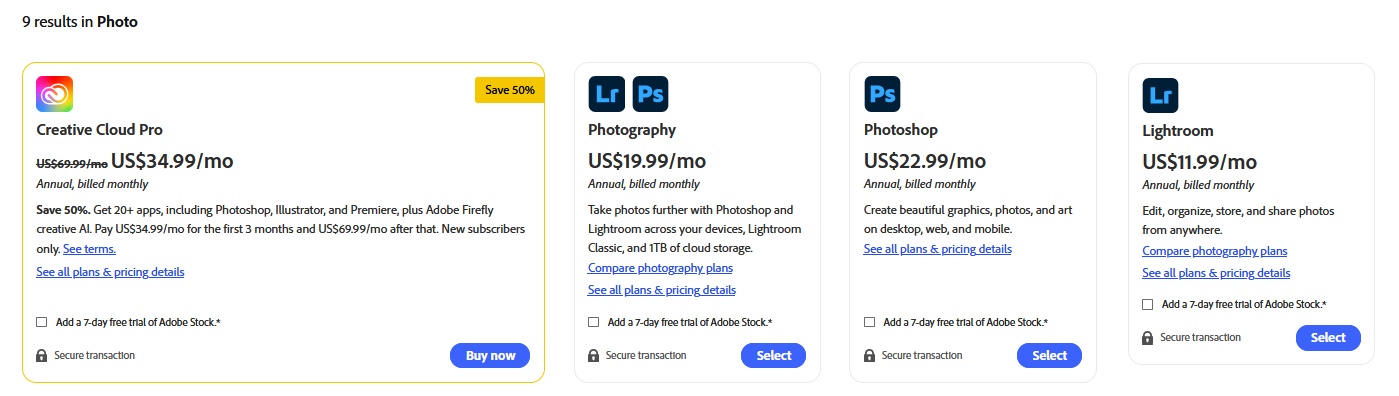
Adobe offers different subscription and billing options, including monthly and annual plans. (Prices in 2026.10.30.)
The Photography Plan includes:
- Adobe Lightroom for desktop and mobile devices
- Adobe Lightroom Classic for desktop computers
- Adobe Photoshop for desktop
- Access to supported web-based editing features
- Cloud storage, depending on the selected plan (including 1 TB options)
Before subscribing, make sure to check the latest pricing, storage capacity, and included applications on Adobe’s official website.
💡 Tip: Adobe also offers subscription plans for businesses, students, teachers, schools, and universities. If you’re not purchasing Lightroom for personal use, be sure to explore these options, as you may be eligible for special pricing or discounts.